2. Installation
2.1. System Requirements
2.1.1. Hardware
Minimum specification:
3 GHz Pentium PC
4 Gb RAM
3 Gb available hard disk space
Recommended specification:
3 GHz Dual Core PC
8 Gb RAM
20 Gb available hard disk space
Tip
For increased performance a multiple core PC with as much RAM as possible is recommended.
2.1.2. Software
Minimum software specification:
.NET framework 3.5 Service Pack 1
Microsoft Access 2000
Microsoft SQL Server 2008 Express
ArcGIS 10.1 or MapInfo 8.0
Recommended software specification:
.NET framework 4.5 or above
Microsoft Access 2016 or later
Microsoft SQL Server 2016 Express or Microsoft SQL Server 2016 or later
ArcGIS 10.1 and later or MapInfo 8.0 and later (32bit versions only)
2.2. Latest Release
The latest release of the tool can be downloaded from GitHub. Two versions of the tool are available:
For ArcGIS or ArcGIS/MapInfo systems (e.g. v3.1.3). Use when ArcGIS is installed or when ArcGIS and MapInfo are both installed.
For MapInfo only systems (e.g. v3.1.3m). Use when only MapInfo is installed.
2.3. Installing the HLU Tool
To install the HLU Tool double-click on the Setup.exe and follow the instructions. By default this will install the HLU Tool into the C:\Program Files\HLU\HLU GIS Tool\ directory and will optionally display the ReadMe file. The installer will also create two shortcuts in the start menu:
HLU Tool - Launch - this will start the tool
HLU Tool - Reconfigure - this will start the tool using the /c switch parameter. See Configuration for details of how to connect to a HLU Tool database and GIS application.
2.3.1. Enable HLU Extension
Important
For ArcGIS users, the tool must be enabled in ArcGIS prior to use. Open ArcMap and go to the Tools menu and select Extensions….
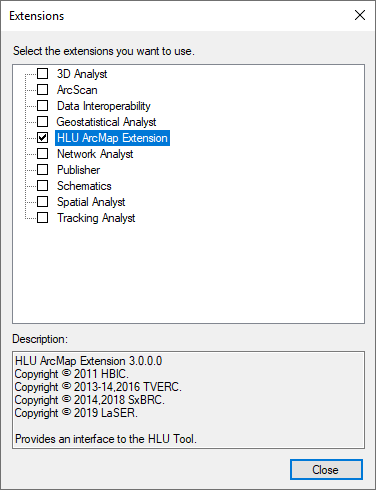
ArcMap Extensions dialog
Tick the box next to ‘HLU ArcMap Extension’ as shown in the figure ArcMap Extensions dialog then click Close and exit ArcMap.
