5. Database
The database consists of 3 types of tables as follows:
Data tables
Lookup tables
Export tables
5.1. Data Tables
Tables in the database prefixed by ‘incid’ are data tables and hence contain all the attribute data relating to the GIS features. The attributes have been separated into 8 tables to ‘normalise’ the data which reduces storage space, improves performance and provides greater flexibility.
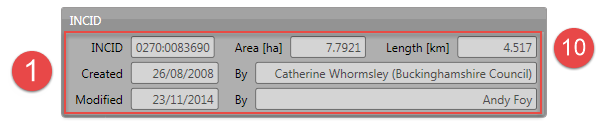
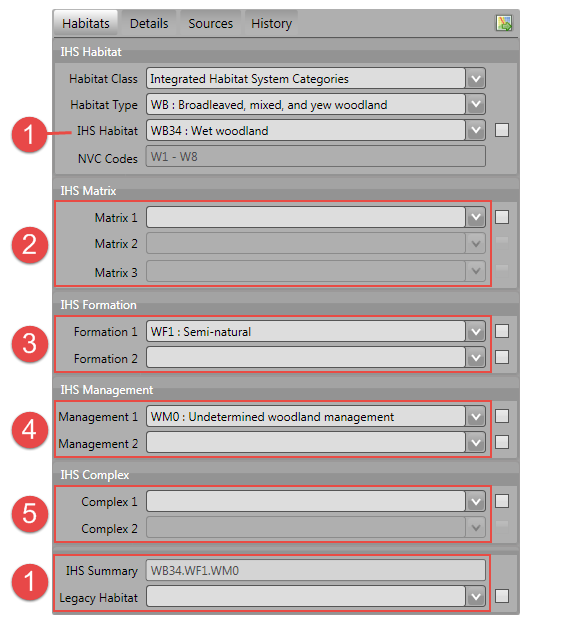
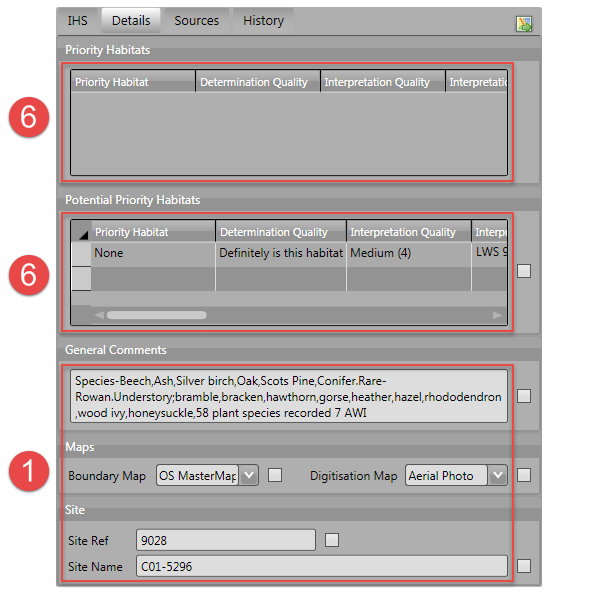
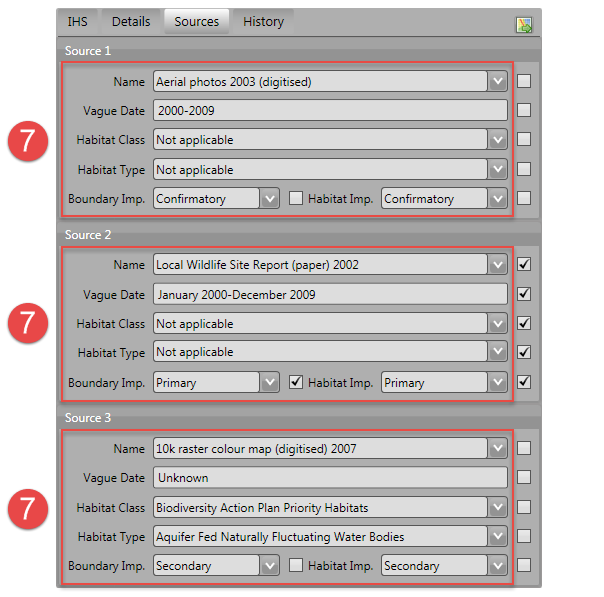
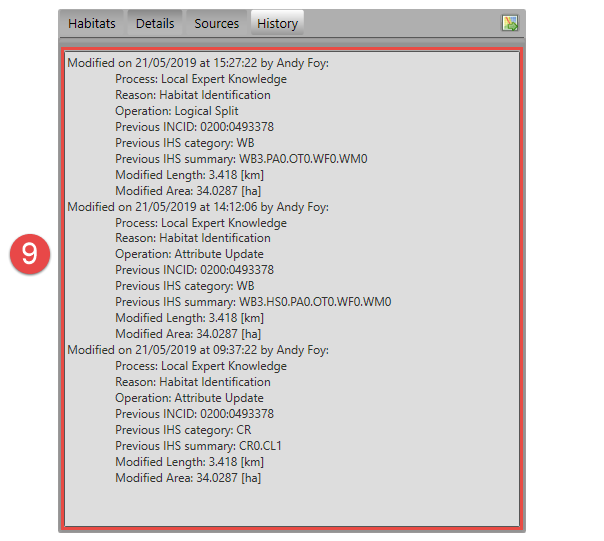
How the data tables relate to the fields in the user interface is demonstrated in the following figures:

5.1.1. incid
This is the main data table with one record per INCID. All the other data tables relate to this table via the INCID field.
- incid
Char(12) - A unique Incremental identifier for each logical group of features.
- legacy_habitat
Char(50) - Foreign key to code in the ‘lut_legacy_habitat’ table representing the legacy Habitat for the INCID.
- site_ref
Char(16) - A free-text field containing a reference for the location of the feature.
- site_name
Char(100) - A free-text field containing a name for the location of the feature.
- boundary_base_map
Char(2) - Foreign key to Code column in the ‘lut_boundary_map’ table representing the data map used to identify the feature boundary.
- digitisation_base_map
Char(2) - Foreign key to Code column in the ‘lut_boundary_map’ table representing the data map used to digitise the feature boundary.
- ihs_version
Char(20) - Foreign key to ihs_version in the ‘lut_ihs_version’ table storing the active version of IHS when the INCID attributes were last updated.
- ihs_habitat
Char(8) - Foreign key to code in the ‘lut_ihs_habitat’ table representing the main IHS Habitat for the INCID.
- general_comments
Char(254) - A free-text field containing any general comments relating to the INCID.
- created_date
DateTime - The date and time that the INCID was first created (either during the initial framework conversion or following a logical split).
- created_user_id
Char(40) - Foreign key to user_id in the ‘lut_user’ table representing the user that created the INCID.
- last_modified_date
DateTime - The date and time that the INCID was last modified.
- last_modified_user_id
Char(40) - Foreign key to user_id in the ‘lut_user’ table representing the user that last modified the INCID attributes or split or merged the INCID.
5.1.2. incid_ihs_matrix
This table contains any IHS Matrix codes recorded alongside an IHS Habitat code to refine the habitat definition for an INCID. There can be between 0 and 3 records for each INCID.
- matrix_id
Integer - A unique ID for each record.
- incid
Char(12) - Foreign key to incid in the ‘incid’ table.
- matrix
Char(8) - Foreign key to code in the ‘lut_ihs_matrix’ table representing an IHS Matrix type.
5.1.3. incid_ihs_formation
This table contains any IHS Formation codes recorded alongside an IHS Habitat code to refine the habitat definition for an INCID. There can be between 0 and 2 records for each INCID.
- formation_id
Integer - A unique ID for each record.
- incid
Char(12) - Foreign key to incid in the ‘incid’ table.
- formation
Char(8) - Foreign key to code in the ‘lut_ihs_formation’ table representing an IHS Formation type.
5.1.4. incid_ihs_management
This table contains any IHS Management codes recorded alongside an IHS Habitat code to refine the habitat definition for an INCID. There can be between 0 and 2 records for each INCID.
- management_id
Integer - A unique ID for each record.
- incid
Char(12) - Foreign key to incid in the ‘incid’ table.
- management
Char(8) - Foreign key to code in the ‘lut_ihs_management’ table representing an IHS Management type.
5.1.5. incid_ihs_complex
This table contains any IHS Complex codes recorded alongside an IHS Habitat code to refine the habitat definition for an INCID. There can be between 0 and 2 records for each INCID.
- complex_id
Integer - A unique ID for each record.
- incid
Char(12) - Foreign key to incid in the ‘incid’ table.
- complex
Char(8) - Foreign key to code in the ‘lut_ihs_complex’ table representing an IHS Complex type.
5.1.6. incid_bap
This table contains details of the priority habitats and potential priority habitats for an INCID. There can be between 0 and 3 records for each INCID.
- bap_id
Integer - A unique ID for each record.
- incid
Char(12) - Foreign key to incid in the ‘incid’ table.
- bap_habitat
Char(11) - Foreign key to code in the ‘lut_habitat_type’ table representing a priority habitat (or potential priority habitat).
- quality_determination
Char(2) - Foreign key to code in the ‘lut_bap_quality_determination’ table representing the accuracy with which the priority habitat has been determined.
- quality_interpretation
Char(2) - Foreign key to code in the ‘lut_bap_quality_interpretation’ table representing how well the priority habitat was interpreted from the source data.
- interpretation_comments
Char(254) - A free-text field containing any comments to explain the reasoning behind the priority habitat determination and interpretation.
5.1.7. incid_sources
This table contains details of the source datasets for an INCID. There can be between 0 and 3 records for each INCID.
- incid_source_id
Integer - A unique ID for each record.
- incid
Char(12) - Foreign key to incid in the ‘incid’ table.
- source_id
Integer - Foreign key to source_id in the ‘lut_sources’ table representing a source dataset.
- source_date_start
Integer - Start date of the data range covered by the source dataset represented as the number of days since 01/01/1900.
- source_date_end
Integer - End date of the data range covered by the source dataset represented as the number of days since 01/01/1900.
- source_date_type
Char(2) - String that describes the format of the date range covering the source dataset.
Vague date types¶ Date Type
Description
Example
D
Single day date
15/10/2010
DD
Day-to-date date range
15/10/2010 - 18/10/2010
D-
Day start with no end date
15/10/2010 -
-D
Day end with no start date
- 18/10/2010
O
Single month date
Oct 2010
OO
Month-to-month date range
Oct 2010 - Nov 2010
O-
Month start with no end date
Oct 2010 -
-O
Month end with no start date
- Nov 2010
Y
Single year date
2010
YY
Year-to-year date range
2010 - 2011
Y-
Year start with no end date
2010 -
-Y
Year end with no start date
- 2011
P
Single season date
Autumn 2010
PP
Season-to-season date range
Autumn 2010 - Winter 2010
P-
Season start with no end date
Autumn 2010 -
-P
Season end with no start date
- Winter 2010
U
Unknown date
Unknown
- source_habitat_class
Char(5) - Foreign key to incid in the ‘lut_habitat_class’ table representing the habitat classification of the source dataset.
- source_habitat_type
Char(11) - Foreign key to incid in the ‘lut_habitat_type’ table representing the habitat type of the source dataset.
- source_boundary_importance
Char(1) - Foreign key to code in the ‘lut_important’ table representing the relative importance of the source when determining the boundary location of all the features in the INCID.
- source_habitat_importance
Char(1) - Foreign key to code in the ‘lut_important’ table representing the relative importance of the source when determining the IHS Habitat and associated multiplex codes of the INCID.
- sort_order
Integer - Determines the (ascending) order the sources for each INCID will be displayed in the ‘Sources’ tab of the main window.
5.1.8. incid_osmm_update
This table contains details of any proposed Ordnance Survey MasterMap (OSMM) updates for an INCID. There will only be OSMM update records if the habitat framework has been externally processed to integrate more recent OSMM data. Any proposed updates based on the new OSMM data will be loaded into this table.
- incid_osmm_update_id
Integer - A unique ID for each proposed update.
- incid
Char(12) - Foreign key to incid in the ‘incid’ table.
- osmm_xref_id
Integer - Foreign key to osmm_xref_id in the ‘lut_osmm_ihs_xref’ table representing a unique set of OS MasterMap attributes.
- spatial_flag
Char(1) - Indicates whether part of the new feature has been changed compared to the original framework.
- process_flag
Integer - Indicates which step in the external OSMM Update process the proposed update was determined.
- change_flag
Char(1) - Indicate whether the proposed habitat category is the same as the original habitat category and whether it is a higher or lower level in the habitat hierarchy.
- status
Integer - Indicates the current status of the proposed OSMM Update (proposed, pending, applied, ignored or rejected).
- created_date
DateTime - The date and time that the proposed update was first created (when the framework was externally processed to integrate more recent OSMM data).
- created_user_id
Char(40) - Foreign key to user_id in the ‘lut_user’ table representing the user that created the proposed update.
- last_modified_date
DateTime - The date and time that the proposed update was last modified.
- last_modified_user_id
Char(40) - Foreign key to user_id in the ‘lut_user’ table representing the user that last modified the proposed update by skipping, accepting, rejecting or ignoring it.
5.1.9. history
This table contains record of every change to every feature made using the HLU Tool.
- history_id
Integer - A unique ID for each record.
- incid
Char(12) - Foreign key to incid in the ‘incid’ table.
- toid
Char(20) - The unique Ordnance Survey topographical identifier of each feature.
- toid_fragment_id
Char(5) - An incremental number (prefixed with zeros) used as a unique reference for each fragment of a single TOID.
- modified_user_id
Char(40) - Foreign key to user_id in the ‘lut_user’ table representing the user that modified the feature.
- modified_date
DateTime - The date and time that the features was modified.
- modified_process
Char(3) - Foreign key to code in the lut_process table representing the activity being undertaken when the feature was modified.
- modified_reason
Char(3) - Foreign key to code in the lut_reason table representing the underlying explanation for the change to the feature.
- modified_ihs_category
Char(2) - Foreign key to code in the ‘lut_ihs_category’ table representing the first 2 characters of the IHS Habitat code prior to the changes to the feature.
- modified_ihs_summary
Char(50) - A concatenation of all the IHS habitat and multiplex codes from the INCID for this feature prior to the changes to the feature.
- modified_operation
Char(3) - Foreign key to code in the lut_operation table representing the operation that undertaken to cause the change to the feature.
- modified_incid
Char(12) - The incid prior to the changes to the feature. In the event of a logical split or logical merge this value will be different to the current ‘incid’, otherwise it will be the same as the current ‘incid’.
- modified_toid_fragment_id
Char(12) - The toid_fragment_id prior to the changes to the feature. In the event of a physical split or logical merge this value may be different to the current ‘toid_fragment_id’ otherwise it will be the same as the current ‘toid_fragment_id’.
- modified_length
Float - A decimal value of variable precision representing the perimeter length of the feature after the changes to the feature.
- modified_area
Float - A decimal value of variable precision representing the spatial area of the feature after the changes to the feature.
5.1.10. incid_mm_polygons
This table is a local database copy of the attribute table for the GIS feature layer to improve performance. If the GIS features are split into separate GIS layers this table contains the attribute records for all the layers combined. There can be any number of records for each INCID, depending upon how many TOIDs and TOID fragments are associated with the INCID.
- incid
Char(12) - Foreign key to incid in the ‘incid’ table.
- toid
Char(20) - The unique Ordnance Survey topographical identifier of each feature.
- toid_fragment_id
Char(5) - An incremental number (prefixed with zeros) used as a unique reference for each fragment of a single TOID.
- ihs_category
Char(2) - Foreign key to code in the ‘lut_ihs_category’ table representing the first 2 characters of the IHS Habitat code.
- ihs_summary
Char(50) - A concatenation of all the IHS habitat and multiplex codes from the INCID for this feature. This field is automatically maintained by the tool.
- shape_length
Float - A decimal value of variable precision representing the perimeter length of the feature.
- shape_area
Float - A decimal value of variable precision representing the spatial area of the feature.
5.2. Lookup Tables
Tables in the database prefixed by ‘lut_’ are lookup tables and are used in many drop-down lists in the user interfaces to restrict choices to only valid or appropriate values for the organisation.
Some of the lookup tables contain records and settings that are generic to all HLU Tool installations and hence should be considered as ‘system’ records (indicated by the system_supplied attribute set to ‘True’ (minus one). These records are configured centrally and updates are applied to HLU Tool installations using the HLUDbUpdater.exe tool (see Database Updater for more details). The remaining lookup tables can be configured for a given HLU Tool installation to tailor them to the specific requirements of each organisation.
Note
Changes to the lookup tables won’t take effect for HLU Tool instances that are running. The HLU Tool will need to be closed and re-started before any lookup table changes to take effect.
Lookup table values are relevant to the whole database system and hence any changes will affect all users of that database.
All records in tables containing a ‘sort_order’ attribute must have a numerical value set or they may not appear in the relevant drop-down lists.
See also
See Configuring Lookup Tables for more information on configuring lookup tables.
The following lookup tables can be updated to tailor local requirements:
5.2.1. lut_users
This table contains details of all the users that have editing capability with the HLU Tool and indicates if they are also able to perform ‘bulk’ updates.
- user_id
The user’s Windows login ID. If the user logs in to a domain then the login should be entered in the format: [Domain]\[LoginID]. [1]
- user_name
The name which will be displayed in the ‘By’ fields of the INCID section and the History tab.
- bulk_update
Determines whether the user has permissions to run a bulk update to change attributes for all selected records. Ticking this checkbox gives the user permission to run bulk updates.
- sort_order
Determines the order user names would be displayed in any relevant drop-down. This field is not currently used (as there are no drop-down lists that display users.)
Caution
Bulk update permission should only be assigned to expert users and should only be used with caution as mistakes can have major affects on the data.
See also
See Configuring Users for more information.
5.2.2. lut_sources
This table contains details of all the source datasets that can be referenced as a ‘Source’ by an INCID.
- source_id
A unique ID for each source.
- source_name
The name which appears in the ‘Name’ drop-down list in the ‘Sources’ tab.
- source_date_default
[Optional]. If a date is entered, the ‘Vague Date’ field in the ‘Sources’ tab will be set to this value (if blank) when this source is selected. If the date is left blank, the ‘Vague Date’ field will not be altered.
- sort_order
Determines the order source names are displayed in the ‘Name’ drop-down list in the ‘Sources’ tab.
See also
See Configuring Sources for more information.
5.2.3. lut_legacy_habitat
This table contains details of all the legacy habitats that can be referenced as a by an INCID.
- code
A unique 50 character field for each legacy habitat.
- description
A brief description or name that will appear in the ‘Legacy Habitat’ drop-down list in the main window.
- sort_order
Determines the order legacy habitats are displayed in the ‘Legacy Habitat’ drop-down list in the main window.
See also
See Configuring Legacy Habitats for more information.
5.2.4. lut_process
This table contains details of all the processes that can be referenced as the activity being undertaken when applying updates with the HLU Tool.
- code
A unique 3 character field for each source.
- description
A brief description or name that will appear in the ‘Process’ drop-down list in the main window.
- sort_order
Determines the order processes are displayed in the ‘Process’ drop-down list in the main window.
5.2.5. lut_reason
This table contains details of all the reasons that can be referenced as the underlying explanation for applying updates with the HLU Tool.
- code
A unique 3 character field for each source.
- description
A brief description or name that will appear in the ‘Reason’ drop-down list in the main window.
- sort_order
Determines the order processes are displayed in the ‘Reason’ drop-down list in the main window.
5.2.6. lut_osmm_ihs_xref
This table contains a cross-reference between all the OS MasterMap feature types and the IHS habitat and multiplex codes. It is used when reviewing and bulk applying proposed OSMM Updates.
- osmm_xref_id
A unique ID for each cross-reference. This field is referenced by the incid_osmm_update table.
- make
An OS MasterMap attribute. Where known it indicates whether the real-world nature of the feature is man-made, natural or both (multiple), otherwise the value is unclassified or unknown.
- desc_group
An OS MasterMap attribute. The primary classification of a feature assigned to one or more of 21 groups, most of which are categories of real-world topographic objects, such as path, building or natural environment.
- desc_term
An OS MasterMap attribute. If present gives further classification information about a feature typically specifying the natural land cover types present.
- theme
An OS MasterMap attribute. The theme(s) that the feature belongs to.
- feat_code
An OS MasterMap attribute. A numerical feature code (a five-digit integer) assigned to each feature.
- ihs_habitat to ihs_complex2
The IHS habitat and multiplex codes corresponding to the unique collection of above OS MasterMap attributes.
- ihs_summary
The consolidated summary of the above IHS habitat and multiplex codes.
- manmade
Indicates if the OS MasterMap feature is considered man-made or not. The classification ‘man-made’ may also include natural features where OS MasterMap is always considered to be accurate (such as rivers, lakes, ponds, road/rail verges, etc.)
- comments
Any user comments relating to the cross-referencing.
5.2.7. Local Flags & Sort Orders
Regardless of whether records in a lookup table are ‘system’ supplied records or not, many can be configured to indicate if they are applicable to an organisation. For example, many lookup tables contain a sort_order field that will determine the order that the values appear in any related drop-down lists. Some tables also have a is_local field that can be used to ‘hide’ values that are not applicable to the local area or should not be used by the organisation.
- is_local
Set to ‘True’ (minus 1) to include in drop-down lists, or ‘False’ (zero) to exclude from drop-down lists.
- sort_order
Set to a sequential, positive numeric whole number to indicate the order records should appear in drop-down lists. Alternatively all records can be set to zero to use the default sort order for that table.
Note
Changes to the lookup tables won’t take effect for HLU Tool instances that are running. The HLU Tool will need to be closed and re-started before any lookup table changes to take effect.
Lookup table values are relevant to the whole database system and hence any changes will affect all users of that database.
All records in tables containing a ‘sort_order’ attribute must have a numerical value set or they may not appear in the relevant drop-down lists.
The following lookup tables can be updated to tailor their is_local and/or sort_order values:
- lut_ihs_habitat
Contains all the IHS Habitats that can be assigned to INCIDs using the ‘Habitat’ field on the Habitats tab of the main window.
- lut_habitat_class
Contains all of the Habitat Classifications that can be assigned to sources using the ‘Habitat Class’ field on the Sources tab of the main window.
- lut_habitat_type
Contains all of the Habitat Types that can be assigned to sources using the ‘Habitat Type’ field on the Sources tab of the main window (for the selected ‘Habitat Class’).
- lut_ihs_complex
Contains all the IHS Complex codes that can be assigned using the ‘Complex’ fields on the Habitats tab of the main window. [sort_order only]
- lut_ihs_formation
Contains all the IHS Formation codes that can be assigned using the ‘Formation’ fields on the Habitats tab of the main window. [sort_order only]
- lut_ihs_management
Contains all the IHS Management codes that can be assigned using the ‘Management’ fields on the Habitats tab of the main window. [sort_order only]
- lut_ihs_matrix
Contains all the IHS Matrix codes that can be assigned using the ‘Matrix’ fields on the Habitats tab of the main window. [sort_order only]
- lut_bap_quality_determination
Contains the BAP determination quality types that can be assigned to Priority Habitats and Potential Priority Habitats on the Details tab of the main window. [sort_order only]
- lut_bap_quality_interpretation
Contains the BAP interpretation quality types that can be assigned to Priority Habitats and Potential Priority Habitats on the Details tab of the main window. [sort_order only]
- lut_boundary_map
Contains the list of map types that can be assigned to the ‘Boundary Map’ and ‘Digitisation Map’ fields on the Details tab of the main window. [sort_order only]
- lut_importance
Contains the difference levels of Importance that can be assigned to Sources using the ‘Boundary Imp.’ and ‘Habitat Imp.’ fields on the Sources tab of the main window. [sort_order only]
- lut_legacy_habitat
Contains the list of legacy habitats that can be assigned to the ‘Legacy Habitat’ field on the Habitats tab of the main window. [sort_order only]
- lut_osmm_ihs_xref
Contains a cross-reference between all the OS MasterMap feature types and the IHS habitat and multiplex codes. [is_local only]
- lut_process
Contains details of all the processes that can be referenced in the ‘Process’ field of the main window to indicate the activity being undertaken when using the HLU Tool. See lut_process for more details. [sort_order only]
- lut_reason
Contains details of all the reasons that can be referenced in the ‘Reason’ field of the main window to indicate the activity being undertaken when using the HLU Tool. See lut_reason for more details. [sort_order only]
- lut_sources
Contains details of all the source datasets that can be referenced as a ‘Source’ on the Sources tab of the main window. See lut_sources for more details. [sort_order only]
- lut_user
Contains details of all the users that have editing capability with the HLU Tool and indicates if they are also able to perform ‘bulk’ updates. See lut_users for more details. [sort_order only]
5.3. Export Tables
Tables in the database prefixed by ‘export’ are export tables and are used to define different formats that can be used to export data from the HLU Tool database and GIS layers to a new ‘standalone’ GIS layer.
See also
See Configuring Exports for more information.
5.3.1. exports
This table lists all the export ‘formats’ that can be used when exporting data.
- export_id
A unique identifier used to determines which fields are selected from the ‘exports_fields’ table.
- export_name
The name which will be displayed in the ‘Export Format’ drop-down list.
Once a new export format has been added to the ‘exports’ table the fields to be included in the export must be added to the ‘exports_fields’ table.
5.3.2. exports_fields
This table defines which fields are to be exported for each export format in the ‘exports’ table. It also defines what the export fields will be called, the order they will appear in the new GIS layer and the number of occurrences of each field (where fields can appear in multiple table records.)
- export_field_id
A unique identifier for the field.
- export_id
The unique identifier for the export type in the ‘exports’ table (see exports).
- table_name
The name of the source table in the database containing the column to be exported.
- column_name
The name of the column within the source table.
- column_ordinal
The number of the column within the source table starting from 1. The export function does not require this column to be completed.
- field_name
The name of the column in the exported GIS layer. The ‘field_name’ must be a valid ArcGIS/MapInfo column name (i.e. containing no spaces or special characters.)
Caution
When exporting to an ArcGIS shapefile field names must be less than 10 characters or they will be truncated or renamed by ArcGIS.
- field_ordinal
Sets the order of the fields in the exported GIS layer.
- field_count
Allows users to set the number of child records to be exported. Fields from the incid table do not support field_count values as there is only ever one incid record for an incid.
- field_type
Allows users to set the data type of the field to be exported.
Valid Export Field Types¶ Field Type
Field Description
Comment
3
Integer
Standard number with no decimal places.
6
Single
Short number with decimal places.
7
Double
Long number with decimal places.
8
Date/Time
Date and Time stamp.
10
Text
Text field up to 254 characters long.
99
AutoNumber
Integer field that automatically increments with each row.
- field_length
Allows users to set the maximum length of text fields. Text input values longer than this length will be truncated during the export without warning.
Note
field_length is only used where the field_type is ‘10’ (text), otherwise it is ignored.
- field_format
Allows users to determine the format of the exported field. See Field Formats for more details on which export fields can be formatted and how to format them.
5.4. Table Relationships
There are 52 tables in the HLU Tool relational database comprised of data tables, lookup tables and export tables. The relationships between the tables are too numerous and complex to display in a single diagram so the tables and relationships have therefore been separated into 7 logical groups, some of which connect and overlap with one another.
Tip
Bespoke relationship diagrams between the various HLU Tool tables can be created using SQL Server Management Studio.
5.4.1. Data Tables
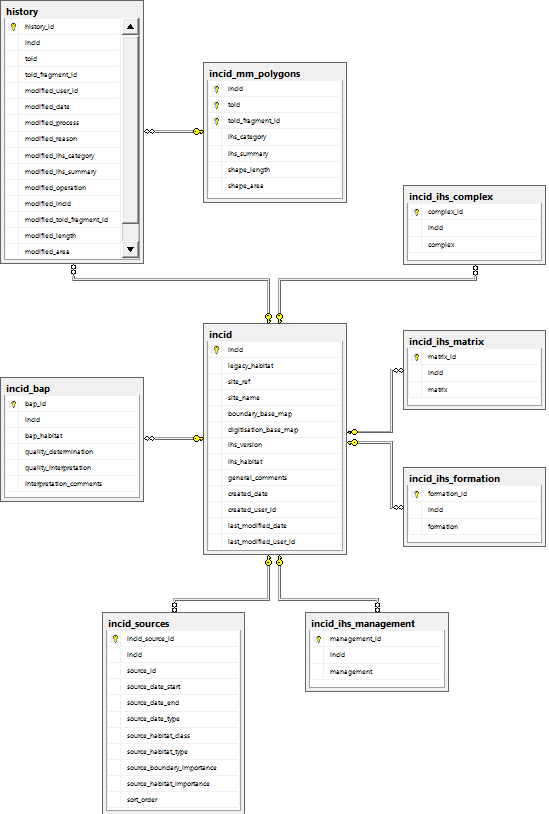
Database Relationships - Data Tables
5.4.2. IHS Lookup Tables

Database Relationships - IHS Lookup Tables
5.4.3. Priority Habitat Tables
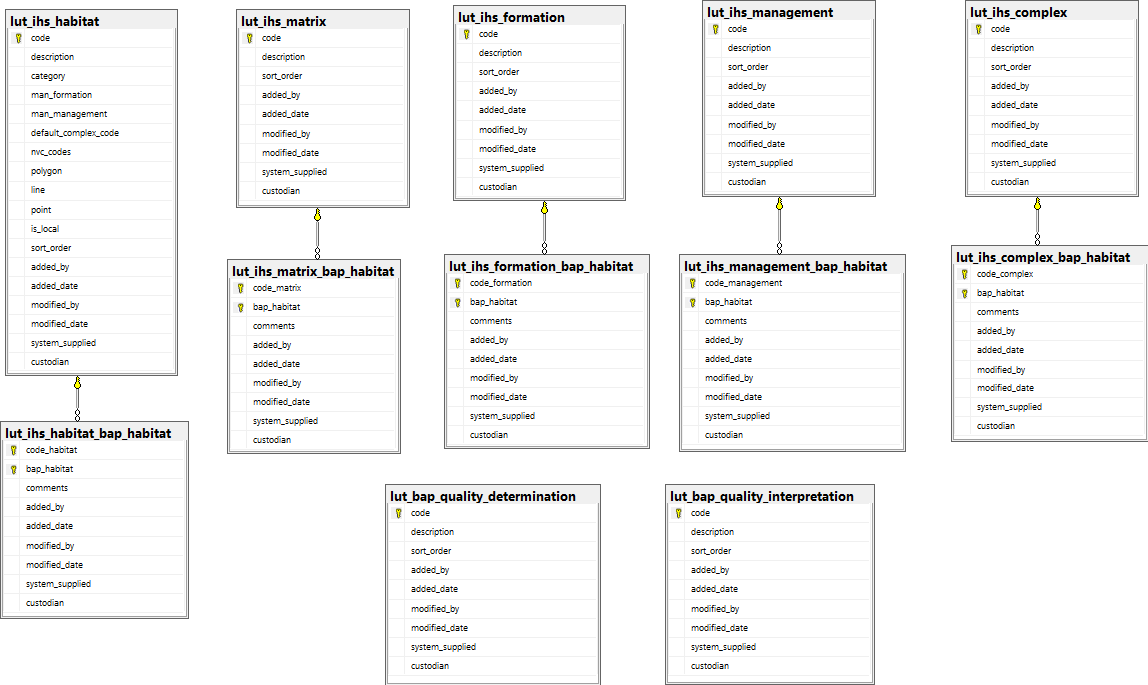
Database Relationships - Priority Habitat Tables
5.4.4. Habitat Tables

Database Relationships - Habitat Tables
5.4.5. Habitat Type Tables
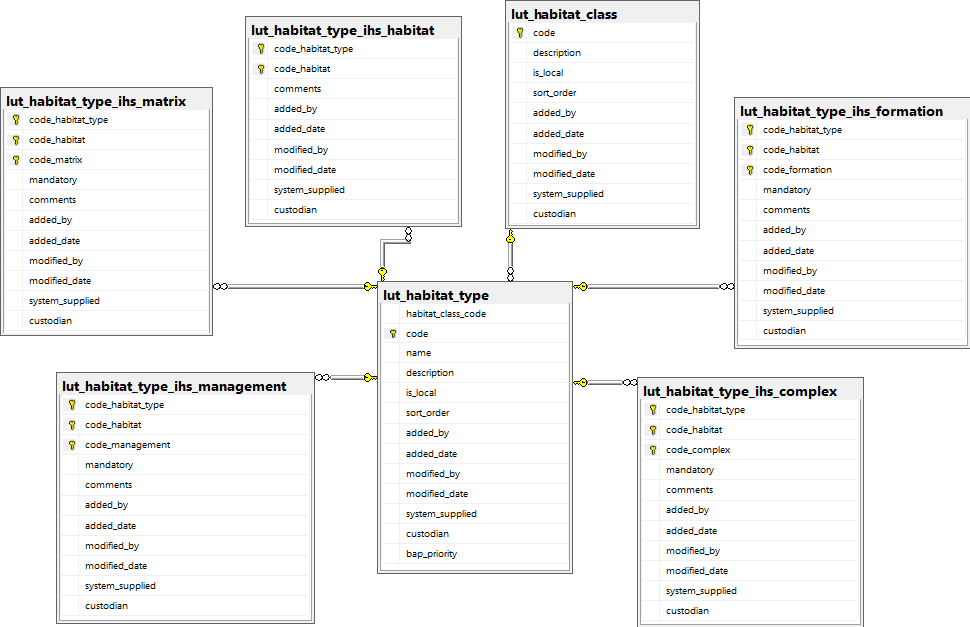
Database Relationships - Habitat Type Tables
5.4.6. Sources Tables

Database Relationships - Sources Tables
5.4.7. History Tables

Database Relationships - History Tables
5.4.8. OS MasterMap Update Tables

Database Relationships - OS MasterMap Update Tables
5.4.9. Other Tables

Database Relationships - Other Tables
